
A Safari dark mode extension works by running scripts inside permitted webpages, resolving the user’s settings, checking whether the site is already dark, and then adding CSS that remaps the page into a new palette. The difficult part is not changing white to black. It is doing that work without flattening every card, recoloring every photograph, fighting a website’s own theme, or losing the result when Safari restores a tab.
The production implementation reviewed here separates those jobs across a Manifest V3 Safari Web Extension, page-side scripts, background logic, a native bridge, and a dynamic rendering engine. The pieces communicate, but they do not share one process or one lifetime.
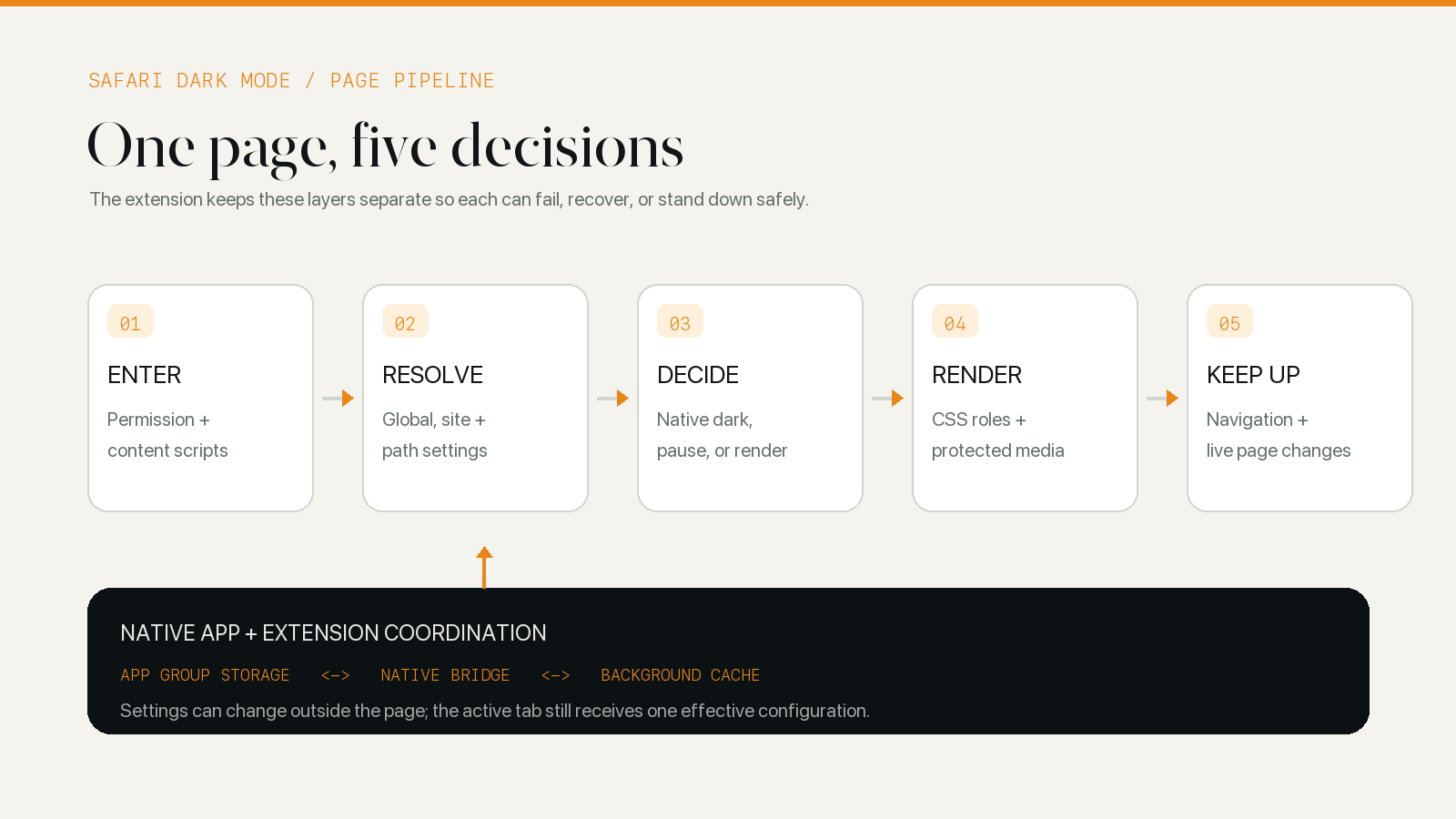
The extension enters before it knows what to do
Open the current manifest.json and the first useful detail is timing. A small proxy script and the main content script are scheduled at document_start, across the top document and its frames. A separate color-scheme watcher runs later. The early scripts are there because a dark theme added after the website has already painted white will always be playing catch-up.
The proxy and content script also run in different JavaScript worlds. The page-world proxy can help with browser APIs and page-owned style sheets that an isolated extension script cannot safely patch by direct reference. The isolated script keeps extension messaging and the renderer away from the website’s own JavaScript scope. That separation is less convenient than one all-powerful script, but it is an important browser boundary.
None of this happens merely because the extension is installed. Safari Web Extensions declare website patterns in their manifest, and the user still controls website access. Apple’s permission documentation distinguishes the requested host access from the permission a person actually grants in Safari. Without that grant, the extension cannot inspect and restyle an ordinary webpage.
That is why the access prompt is broad for a tool intended to work across the web: the renderer needs to read page structure and styles on whichever site the user chooses to use it. The same boundary means some Safari and system pages remain outside its reach. Permission answers “may the extension enter this document?” It says nothing yet about whether changing the document would be a good idea.
Background logic reduces many settings to one answer
Once the content script connects, it identifies the document and asks the background layer what should happen for its URL. The background side has more context than the page: the global mode, system or scheduled automation, the selected theme, temporary pauses, and any narrower setting saved for that site.
The configuration resolver uses a deliberate order. A path-specific entry can win over a subdomain, which can win over the root domain; if none exists, the global app setting remains in force. This is how one difficult account page can be paused or assigned another theme without changing the rest of the domain.
The result is not simply an on/off flag. The background layer also decides which rendering engine and palette to send, whether a dark preset should respect the site’s own dark appearance, whether a pause has expired, and whether the current automatic mode is active. Only after those questions have one answer does the page receive a render or clean-up message.
Keeping this decision outside the content script has a practical advantage on iPhone and iPad: the native app does not need to launch for every navigation. The extension maintains a working cache and can answer an ordinary page connection itself. The native bridge is used to refresh that state and carry changes between the app and extension, not to perform the page’s CSS work.
A site that is already dark should usually be left alone
Safari does not provide an API that returns “this website is visibly using a complete dark theme.” The platform exposes smaller signals. A site can respond to prefers-color-scheme, declare color-scheme, publish a color-scheme meta element, add a theme class, or implement its own control. Those signals describe related things, not the same thing.
WebKit’s explanation of dark mode support in web content makes the browser’s role clear: websites opt into dark styling and provide the relevant CSS; Safari does not indiscriminately invert the open web. An extension therefore has to determine the page’s current result rather than assuming that a dark system appearance made the document dark.
The detector starts with explicit evidence such as a dark-only computed color scheme, a color-scheme meta declaration, common root attributes, and site-specific detector hints. When those do not settle the question, it samples computed backgrounds across the visible viewport. It looks for bright opaque surfaces and also handles the awkward case where the document root and body are transparent. During that check, the extension temporarily disables its own injected styles so it does not mistake its work for the site’s.
This remains a heuristic. A dark header above a bright application surface can mislead a shallow sample; a site can declare dark support while leaving part of the interface light. The implementation therefore keeps a global and per-site override. With a dark preset selected, the normal policy is to stand down when a native dark theme is detected, but the user can tell the extension to continue on a site where that decision is wrong. How a Safari Extension Detects a Website’s Native Dark Theme examines that decision without compressing it into one paragraph.
Dynamic rendering works on CSS roles, not finished pixels
After the decision to render, the easy solution would be a filter on the whole page. It is fast to describe and blunt in practice: the filter sees the finished picture, so a white card, a product photograph, a video frame, and a white logo all enter the same transform.
The principal themes use a dynamic path instead. The JavaScript rendering layer is built on and adapted from Dark Reader’s open-source engine; the native app, configuration model, Safari lifecycle work, and site controls surround that rendering foundation. The distinction matters because the dynamic engine is substantial technology, but it should not be presented as an unrelated invention.
CSS is rewritten according to its job
The renderer walks manageable style sheets and examines declarations that can affect color: backgrounds, foreground text, borders, shadows, gradients, and images. A light page background is moved toward the theme’s background anchor. Dark text is moved toward the text anchor. A border is transformed as a border rather than promoted to full-strength body text.
The source color still matters. A blue link should normally remain recognizably blue, while a pale blue selected state needs enough separation from the new surface. Dynamic rendering preserves these relationships by applying different transformations to foregrounds and backgrounds instead of replacing every color with one of two fixed values.
Modern CSS makes that work recursive. A declaration may point to a custom property whose value comes from another property, a media query, or JavaScript. The current engine tracks variable types and dependencies, handles alpha colors and gradients, and rebuilds affected rules when a value changes. It also works with inline styles, constructed or adopted style sheets, and styles discovered inside accessible shadow roots.
This is why CSS Filter vs Dynamic Theme is a separate subject. The difference is not a cosmetic preference between two dark palettes; it is a choice between transforming the composited result and interpreting the page’s style system.
Media needs a more conservative rule
Ordinary photographs and video are content, not surfaces. They should normally keep their colors while the player shell, caption panel, product card, or surrounding article changes. Background images are harder because CSS does not say whether a URL is a photograph, a texture, an icon, or a substitute for a solid fill.
The dynamic engine can inspect a reduced image sample, consider transparency and image size, and decide whether a small asset behaves more like an icon or a piece of content. It caches that work so repeated assets are not decoded and classified from scratch. Site-specific rules can exclude an element when the general heuristic has too little information.
No heuristic can infer every author’s intent. Canvas charts, image-based diagrams, color-critical products, and cross-origin documents can still require an exception or no transformation at all. The dedicated article on protecting images and video in dark mode covers those limits in detail.
The first render is only the beginning
A static article can make extension work look like a one-time conversion. Real pages keep moving. A single-page application replaces route content without a full reload. A component inserts a new style sheet after an interaction. A custom element attaches its shadow root late. The system appearance changes at sunset. Safari freezes a background tab and later restores it from the back-forward cache.
The content layer watches DOM and style-sheet changes, batches repeated work, and reconnects document state after page-show and resume events. Style managers retain hashes and transformation caches so an unchanged sheet does not need a complete rebuild. Image work runs through queues rather than blocking every other part of the theme.
There is still a visible tradeoff at first paint. An early fallback can cover a bright canvas quickly, but it does not yet understand every component. Waiting for full analysis produces a more precise result but leaves more time for the original light page to appear. The renderer therefore stages the work: establish a safe initial surface, read the available styles, then replace the fallback with generated rules and continue refining as the page changes.
Manifest V3 adds another lifecycle concern: the background context is not treated as a permanently running process. The current manifest declares a non-persistent background module, and the page connection protocol is designed to resume instead of assuming an old in-memory relationship will always survive. Manifest V2 and V3 deserve their own comparison; for this architecture, the important fact is that recovery is part of normal operation, not an exceptional error path.
The native app and web extension meet through a bridge
Apple describes a Safari Web Extension as separate app, JavaScript, and native app-extension environments. The architecture reviewed here follows that split.
The app writes its normalized configuration to an App Group container. That configuration includes the selected built-in theme and the global and site-level choices needed by the extension. The background script asks the native extension for the current configuration through native messaging, then stores a local working copy. A change made from the extension interface travels back through the same bridge, is merged into shared configuration with a modification time, and notifies the app that new state is available.
This arrangement solves two different problems. Shared storage gives the native app and native extension a common hand-off point. The extension-side cache gives an active Safari page a fast answer even when the app is not open. Neither mechanism alone is sufficient for a responsive extension that also keeps app and site settings aligned.
The public architecture stops at behavior that affects dark mode. Unrelated internal services are not needed to explain how a page gets its theme, and they do not belong in this article.
Where a dark mode extension reaches its limit
The pipeline is broad, not omnipotent. It cannot style a page Safari will not expose to it. It cannot safely interpret every pixel drawn into a canvas. A parent document cannot reach through every cross-origin frame. A closed shadow root does not present the same surface as an ordinary DOM subtree. Website updates can also invalidate a selector that was correct the day before.
Those are different failure classes and should lead to different responses. A permission problem needs a Safari setting, not another CSS rule. A native-theme false result needs a detector hint or user override. A broken logo may need a media exclusion. A newly bright dialog may need the renderer to observe a later style source. Treating all four as “dark mode does not work” makes diagnosis harder and compatibility fixes broader than they need to be.
For a reader, the practical sequence is simpler: grant website access, let the site use its own dark theme when it has a good one, and use an extension for the pages that remain bright. How to Enable Dark Mode for Websites in Safari covers that setup. For a visible example of the resulting CSS hierarchy, the Classic Midnight Wikipedia field test compares the same article in its light, native-dark, and extension-rendered states.
A Safari dark mode extension is therefore best understood as a live compatibility layer. Permission lets it enter. Background logic chooses one configuration. Detection decides whether to stand down. The renderer maps CSS roles into a new palette and treats media separately. Lifecycle handling keeps that decision attached while the page, browser, and settings continue to change.