Manifest V3 changes how a Safari Web Extension declares permissions, runs background work, injects scripts, defines its toolbar action, and applies its extension-page security policy. It does not replace the content script or solve the webpage problem for it. A dark mode renderer still has to inspect and maintain the same CSS, images, frames, and live DOM after either manifest has delivered it to the page.
There is also a Safari-specific detail that gets lost in cross-browser summaries: Manifest V3 does not force every Safari extension to use a service worker. Safari supports a service worker or a non-persistent background page. The implementation reviewed here uses the second option.
The number belongs to the extension manifest
“V2” and “V3” refer to the version of the Web Extension manifest format, not a version of Safari, iOS, or the JavaScript language. The manifest is the JSON contract that tells Safari which scripts belong to the extension, where they may run, which browser capabilities they request, which background entry point should wake for events, and which interface appears behind the toolbar button.
Safari Web Extensions use the broadly shared Web Extensions model, then ship inside an Apple app-extension package. Apple’s Safari Web Extensions overview describes that cross-browser foundation as JavaScript, HTML, CSS, and common extension formats packaged for Safari on Apple platforms.
Changing "manifest_version": 2 to 3 is therefore not a rendering upgrade. It changes the rules around the JavaScript. Some source can remain identical, some APIs move, and assumptions about a background page staying alive must be removed.
Safari supports both versions, but their lifecycles differ
Apple’s current browser compatibility guidance says Safari 15.4 and later supports both Manifest V2 and Manifest V3. That is worth stating plainly because browser-extension discussions often assume one universal removal schedule. Safari’s current documentation does not justify claiming that every V2 extension has stopped working.
The largest architectural difference is background execution.
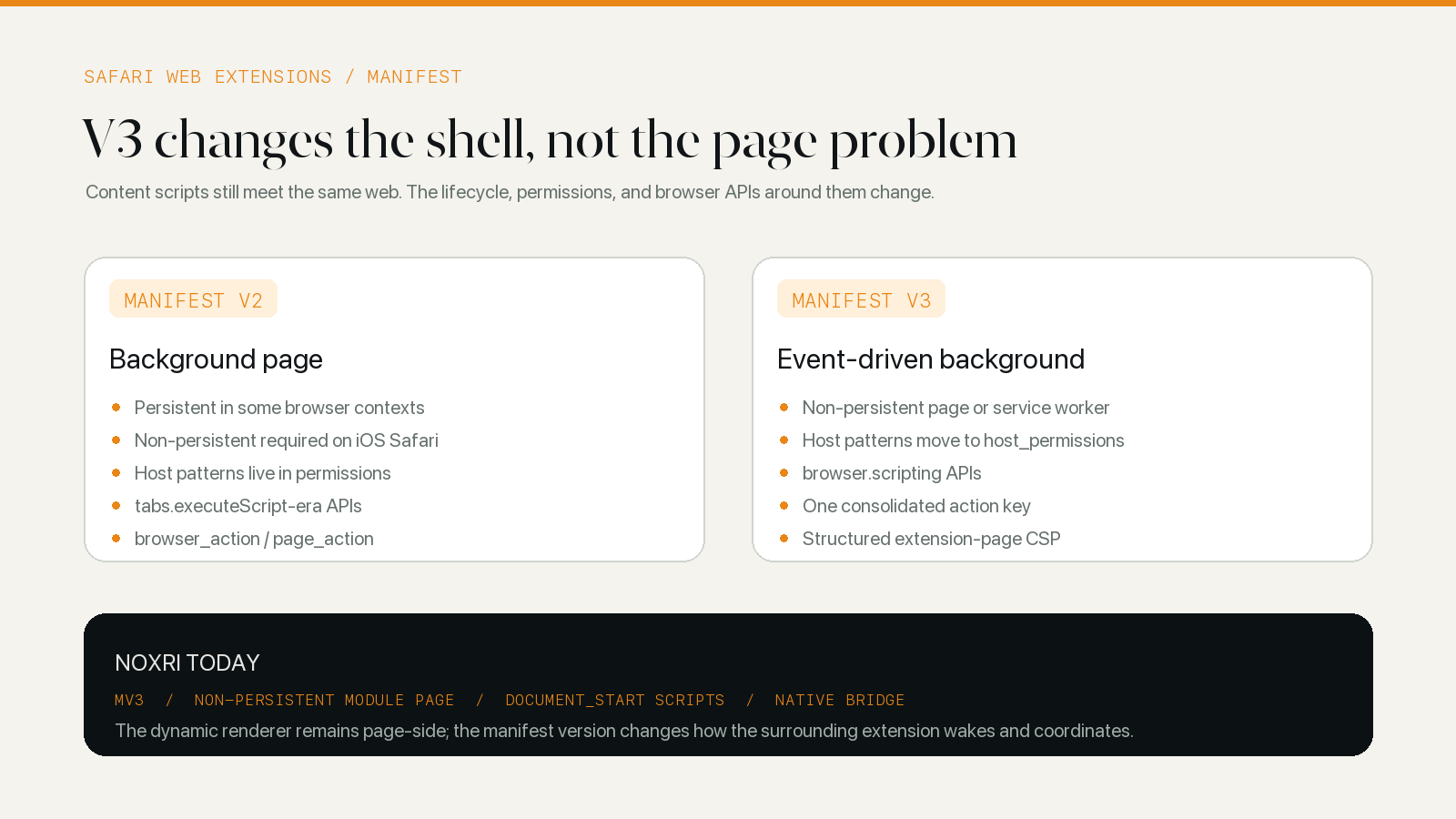
Manifest V2 was designed around a background page. Depending on browser and platform, that page could be persistent or non-persistent. Safari already imposed an important limit on iPhone and iPad: a background page must use persistent: false. A mobile extension could never safely treat that page as a small server that would remain in memory forever.
Manifest V3 makes the event-driven model explicit. Apple introduced V3 support in Safari 15.4 with two background choices: a service worker or a non-persistent background page. Apple’s WWDC22 session, What’s new in Safari Web Extensions, demonstrates the service-worker route for cross-browser compatibility but also says a non-persistent page remains valid in Safari.
That distinction matters more than the label. A service worker and a background page expose different web globals and loading patterns. An existing codebase that expects a document, module graph, or page-style background environment may reasonably keep the non-persistent page in Safari while still moving the manifest to V3.
V3 moves several declarations and APIs
Background lifetime receives most of the attention, but it is not the only migration work.
Website access moves to host_permissions
In a V2 manifest, website patterns could appear with API permissions inside the permissions array. V3 separates the concerns: browser capabilities remain in permissions, while website patterns move into host_permissions. Content scripts also retain their own matches patterns.
This is a manifest reorganization, not an automatic permission grant. Safari still asks the user to allow website access. Apple’s Safari extension permission guide explicitly separates what the manifest requests from what Safari’s user has approved.
For a dark mode extension, host access is functional rather than incidental. Its content script must read the page’s DOM and style information and insert generated styles. The manifest can request that reach; the user remains the final authority over whether it runs on a particular site.
Programmatic injection uses scripting
V2-era extensions often call methods such as tabs.executeScript or tabs.insertCSS. V3 consolidates programmatic script and style injection under the scripting API. The target tab and, when necessary, frame identifiers become explicit inputs.
This change is easy to overstate for extensions that declare content scripts up front. A script listed under content_scripts is still matched and injected according to the manifest. The scripting API matters when the extension needs to register or inject code programmatically; it does not make declared content scripts obsolete.
Toolbar actions and security policy are reorganized
V2 exposed separate browser_action and page_action manifest keys. V3 consolidates the toolbar entry under action. The extension Content Security Policy also changes from a simple string into an object whose extension_pages entry governs extension-owned pages. Apple’s WWDC22 migration walkthrough notes that remotely hosted scripts are not allowed under the V3 extension-page policy.
Those changes influence packaging and extension UI, but none tells a renderer how a pale blue border should look on a dark background. That work remains in the page engine.
A production V3 design without a service worker
The current production manifest starts with manifest_version: 3 and declares this background shape:
{
	"background": {
		"scripts": ["background/background.js"],
		"type": "module",
		"persistent": false
	}
}
This is a non-persistent module background page, not a service_worker entry. Safari 16.4 added module support for both background pages and workers when "type": "module" is present, as recorded in WebKit’s Safari 16.4 release notes.
The rest of the manifest follows the V3 organization. Website patterns are in host_permissions; browser capabilities such as scripting, storage, alarms, and nativeMessaging are declared separately. The toolbar popup sits under action. Extension-page CSP uses the V3 object form.
The content scripts are more important to visible dark mode than any of those keys. The extension injects a page-world proxy and an isolated content script at document_start, in all frames that meet the manifest’s matching and permission rules. A later top-frame script watches the system color-scheme signal. Moving to V3 did not turn those scripts into a service worker; they still run beside the webpage they need to read and style.
How Safari Dark Mode Extensions Work follows the full path from those manifest entries to native-theme detection and generated CSS.
A non-persistent background changes how state is designed
The word “background” can suggest a process that is always present. In Safari, that is the wrong mental model for this architecture. The background context can be recreated, so important configuration cannot exist only in module-level variables.
The implementation addresses that in layers. The JavaScript background manager keeps an extension-side cached configuration. On initialization it can load cached state and request the current configuration through Safari native messaging. The native side reads the normalized app configuration from shared App Group storage. When the background context resumes, it reconstructs enough state to answer content scripts again.
Document identity also has to recover. The content script sends connection and resume messages, responds to a liveness check, and reports page-show or resume events after Safari restores a document. The background side can then recalculate the effective site setting and resend a render or clean-up command instead of trusting an old connection record.
This recovery logic is not a bonus added for unusually broken devices. It is the normal cost of an event-driven extension. A dark mode tool that remembers its CSS but forgets why that CSS was selected can restore the wrong theme just as easily as it can restore no theme at all.
The renderer still faces the same webpage
Neither manifest version changes how websites express color. A page can still use CSS variables that change after load, constructed style sheets, a closed shadow root, a cross-origin iframe, canvas drawings, background images, or a native dark theme with no standard toggle.
The content script and renderer handle those cases. Manifest V3 can influence when the surrounding extension wakes and which API delivers a message, but it does not classify an image, transform a gradient, or determine whether a site is already dark. Those are page-model problems.
That is why it would be misleading to describe an extension as better at dark rendering merely because its manifest says V3. The relevant evidence is the dynamic rendering path, the detector, the lifecycle recovery, and the compatibility rules. CSS Filter vs Dynamic Theme explains the rendering choice; native dark-theme detection covers the separate decision to render at all.
Should a Safari extension move from V2 to V3?
For a new extension, V3 is the sensible starting point: it matches the current shared direction of the Web Extensions platform and provides the newer scripting, action, permission, and policy structure. A cross-browser project may prefer a service worker to keep its background entry point aligned with other V3 browsers.
An existing Safari extension still needs an engineering decision, not a version-number reflex. Audit the background environment, event listeners, saved state, programmatic injection, permissions, toolbar keys, CSP, native messaging, and minimum Safari version. If a service worker adds churn without solving a Safari requirement, Apple’s non-persistent background-page option is real and should be evaluated.
For users, the manifest version is not a useful proxy for theme quality or trust. The visible questions remain more concrete: does the extension receive the website access it needs, respect a site’s native dark mode, keep media recognizable, recover across navigation, and offer a local way to stop when a page should not be changed? The setup side of that boundary is covered in How to Enable Dark Mode for Websites in Safari.