
A Safari extension can offer two very different ways to change the same setting. Open the containing app and you expect a complete control panel: choose the default behavior, review every customized website, and remove old exceptions. Open the extension inside Safari and the useful question is much narrower: what should happen on the website in front of me?
Those interfaces should not own separate configurations. The clean design is one shared model with two views. The app is the control plane for defaults and the complete site list. The extension popup is a contextual editor for the current site. Both eventually update the same local state, and the page renderer consumes one resolved answer.
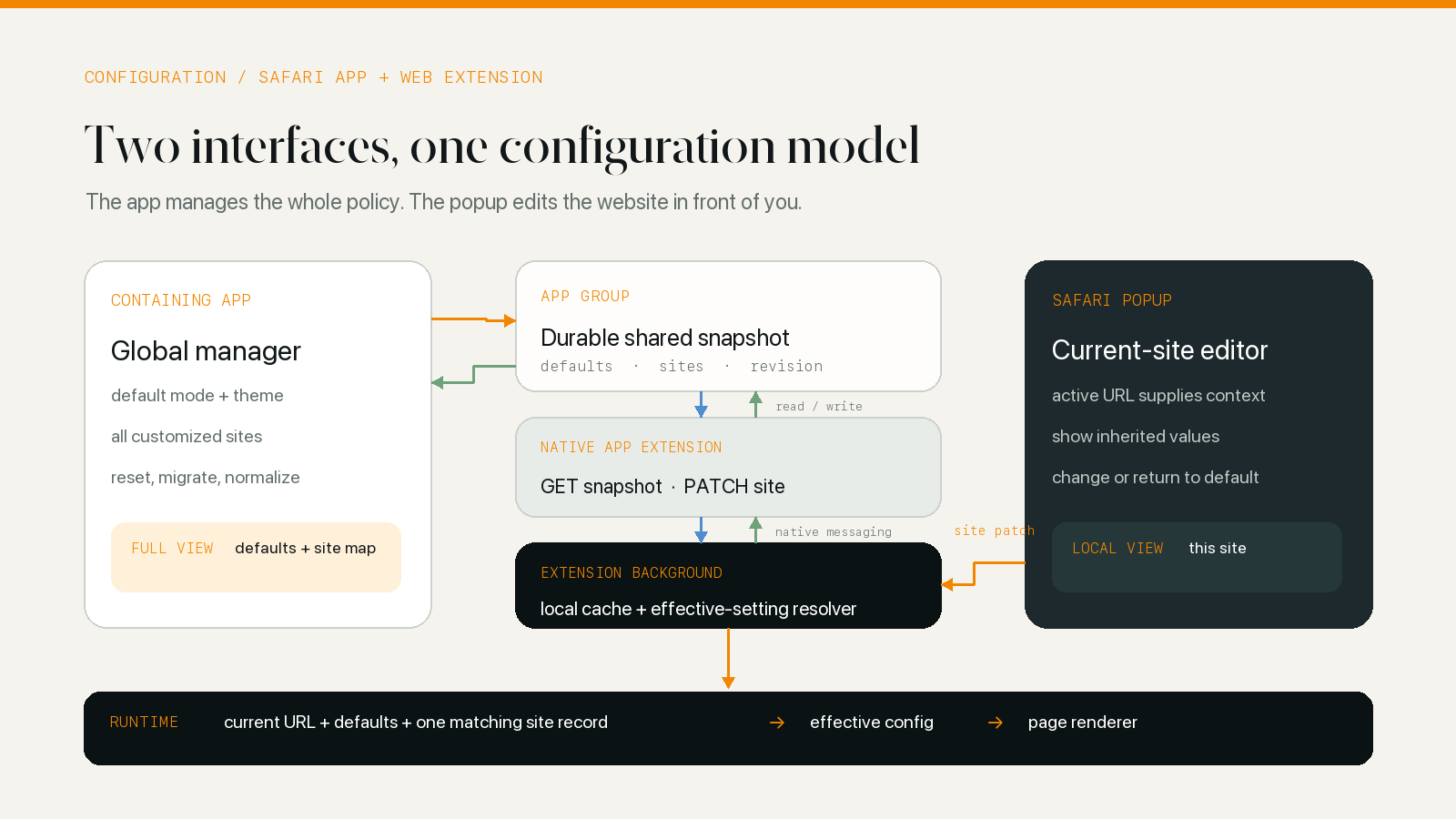
One configuration model, two useful views
Imagine a user who wants dark mode to follow the system everywhere, prefers a gray theme for documentation sites, and has disabled it on a color-critical design tool. In the app, these choices belong on one screen or in one settings hierarchy. The user can see the default, the list of exceptions, and which fields each site overrides.
The extension popup has no reason to reproduce that dashboard. Safari already supplies the context. If the active tab is docs.example.com, the popup can show whether that site inherits the default and let the user change its mode, theme, or native-dark handling in place.
This division is more than a UI preference:
- The app is convenient for setting policy and cleaning up many sites.
- The popup is convenient for fixing the page that exposed a problem.
- The renderer should not care which interface created the setting.
The last point prevents a common architectural mistake. If “app settings” and “extension settings” become separate stores, synchronization turns into a permanent conflict-resolution problem. When they are two editors for the same schema, synchronization is a transport problem with a clear destination.
Safari splits the feature across three environments
A Safari web extension packaged for iOS is not one process with one memory space. Apple describes three independently sandboxed parts: the containing app, the JavaScript web extension, and a native app extension that mediates between them. Apple’s app and JavaScript messaging documentation also distinguishes native messaging from shared App Group data.
The containing app owns the full settings interface and can persist native models. JavaScript in the extension owns the browser-facing UI, background logic, tab state, and messages sent to content scripts. The native app extension receives sendNativeMessage requests from extension pages or the background context and reads or writes data the containing app can also access.
An App Group supplies the durable meeting place. With the App Groups entitlement enabled for the related targets, the app and native app extension can use a shared container or shared preferences such as UserDefaults(suiteName:). Apple documents that pattern in Configuring App Groups.
JavaScript does not open that native preferences database directly. It asks the native app extension for a serializable snapshot or sends a change through native messaging. This boundary is useful: it gives one native component responsibility for validating messages and translating between JavaScript objects and the stored model.
For the broader placement of background scripts, popups, content scripts, and native messaging, see How Safari Dark Mode Extensions Work.
The durable model can stay small
The configuration does not need a database. For this kind of same-device setting, a compact local document is enough:
{
	"defaults": {
		"mode": "auto",
		"theme": "gray",
		"nativeDarkPolicy": "respect",
		"schedule": { "start": "20:00", "end": "06:00" }
	},
	"sites": {
		"docs.example.com": {
			"theme": "sepia",
			"modifiedAt": 1783936800
		},
		"studio.example": {
			"mode": "off",
			"modifiedAt": 1783936920
		}
	},
	"revision": 42
}
The defaults object describes ordinary behavior. The sites map stores exceptions keyed by a normalized host or another explicitly supported scope. A site record is partial: docs.example.com changes the theme but continues to inherit the default mode and native-dark policy.
Keeping overrides partial matters. Copying the entire default configuration into every new site record feels convenient at first, but it quietly breaks inheritance. If the user later changes the default schedule, every copied record continues carrying yesterday’s value. A partial record says what the user actually changed.
Resolve one effective setting at runtime
The runtime needs a deterministic precedence rule. A simple version is:
const site = sites[currentHost];

const effective = {
	mode: site?.mode ?? defaults.mode,
	theme: site?.theme ?? defaults.theme,
	nativeDarkPolicy: site?.nativeDarkPolicy ?? defaults.nativeDarkPolicy
};
Some extensions support root-domain, subdomain, and page-specific records. In that case, select the most specific matching record first—page, then subdomain, then root domain—and let missing fields in that record fall back to the global defaults. Do not accidentally merge arbitrary values from several site scopes unless that behavior is part of the documented model; it becomes difficult for both the UI and the user to explain where a value came from.
The popup should make inheritance visible. “Default (Gray)” is clearer than displaying “Gray” as if the site owns that choice. Returning a field to Default should remove the override, and an empty site record should disappear from the managed-site list.
The app is the control plane
The app can answer questions that a contextual popup cannot answer well:
- What is the default mode and theme?
- Which websites have individual settings?
- Does a site override one field or several?
- Which exceptions are no longer needed?
- What will change if the default theme changes?
That makes the app the natural place for global mode, automation, the default theme, native-dark policy, PDF policy, and the complete list of customized sites. A site detail screen can show the effective value beside the local override and offer a deliberate “use default” action.
The app should normalize before saving. Unknown theme identifiers need a fallback, missing default fields need current defaults, obsolete values need migration, and hosts need one canonical form. Normalization at the control plane keeps the extension from carrying compatibility branches forever.
The popup remains intentionally smaller. It knows the active URL, chooses the supported scope, shows the effective result, and sends only the user’s current-site change. Its convenience comes from context, not from owning a second configuration system.
The synchronization path is deliberately asymmetric
It is tempting to make every component exchange the entire document in both directions. A safer design uses different message shapes for different jobs.
App to extension: publish an authoritative snapshot
When the app changes a default or edits any managed site, it writes a normalized full snapshot to the App Group. The extension background later requests that snapshot through the native app extension. If the revision or content changed, the background replaces its cached configuration and recalculates the state sent to open tabs.
A full snapshot works in this direction because the app has the global view. It can validate the whole model before publishing, and replacement removes stale site records that no longer exist.
Popup to app: send a site-scoped patch
When the popup changes the active site, the extension background can update its in-memory state immediately so the page responds without waiting for a native round trip. It then sends a site-scoped payload through native messaging. The native app extension merges that record into the shared document, adds a modification marker, writes it back to the App Group, and signals the app to refresh its view.
The payload should identify the target and the intended operation. An update such as {host, patch} is safer than submitting an old full snapshot that might erase a setting the app changed a moment earlier. Deletion deserves an explicit operation or a tombstone; the absence of a host in a partial payload is not enough to distinguish “delete this site” from “this message did not include it.”
This asymmetry gives each interface the write operation that matches its knowledge: the app publishes the whole validated state; the popup changes the site it can currently see.
Cache first, then reconcile with native state
Safari does not promise that the extension background context will remain alive. Under Manifest V3 it may be suspended and recreated, and an iOS containing app cannot directly push a message into the web extension’s JavaScript when a setting changes. That platform boundary is easy to miss; Apple’s messaging documentation explicitly limits app-to-JavaScript messaging to the macOS path.
Waiting for native messaging before doing anything creates a poor cold start. The page may stay bright while the extension wakes its native counterpart and loads the shared snapshot. A better startup has two phases:
- Load the extension’s last local cache and make the first rendering decision.
- Request the native snapshot in the background and reconcile if it differs.
The cache is a speed layer, not a second authority. A timeout can allow the extension to keep using the last known state when the native request is unavailable, but later lifecycle signals should try again. Useful reconciliation points include extension startup, Safari returning to the foreground, active-tab changes, and recovery from an idle state.
This design fits the lifecycle constraints explained in Safari Web Extensions: Manifest V3 vs Manifest V2: durable behavior comes from reconstructing state, not assuming a permanent background process.
Revisions and timestamps prevent broad overwrites
Even on one device, updates can cross. A user can change the app, return to Safari, and use the popup before the background has fetched the new snapshot. A suspended background can also resume with an older cache.
A document revision quickly answers whether a complete snapshot is newer. Per-record modification timestamps or monotonically increasing versions allow narrower merges when optional device sync is added later. Compare the global block independently from each site record; one recently edited site should not make an older global default overwrite a newer one.
Timestamps are not a substitute for clear operations. Use them with these rules:
- A native full snapshot can replace extension cache after validation.
- A popup patch modifies only its named site and fields.
- A reset removes an override rather than copying the current default into it.
- A deletion uses an explicit delete message or a retained tombstone.
- Equal or malformed versions fall back to a documented, deterministic policy.
Optional cloud synchronization belongs outside the browser-critical path. It can merge into the app’s durable model and then publish a new local snapshot. The extension should not need a network connection or a remote database to decide how the current page should render.
The renderer only needs the effective answer
The content script does not need the complete managed-site list, App Group identifiers, timestamps, or conflict history. The background layer resolves the active URL and sends a compact rendering decision: enabled state, selected theme, native-dark behavior, pause state, and any relevant compatibility data.
That separation keeps storage logic out of page code. It also makes runtime decisions easier to test. Given the same URL, defaults, site record, system appearance, and native-dark signal, the resolver should always produce the same answer.
The native-dark signal is another input, not another configuration store. A site may inherit “respect native dark mode” from the default or override that policy locally; the detector supplies the observation. How a Safari Extension Detects a Website’s Native Dark Theme covers that decision. Once rendering is allowed, How Dynamic Dark Mode Rendering Rewrites a Web Page explains what consumes the selected theme.
Test the transitions, not only the final values
The most revealing tests cross a process boundary:
- Change the global default in the app, return to an already open Safari tab, and verify the extension reconciles.
- Change the current site in the popup, then open the app and confirm the site appears in the full list.
- Reset one site field to Default and verify later global changes flow through it.
- Remove the final override and verify the empty site record no longer appears.
- Test root domains, subdomains, and page scopes without letting one silently shadow another.
- Kill the app, suspend the extension background, reopen Safari, and verify cached startup followed by native correction.
- Change settings quickly in both interfaces and confirm unrelated sites are not overwritten.
- Combine automatic mode, a site theme, a temporary pause, and native-dark detection to verify the final precedence.
A screenshot of the final dark page proves very little about this architecture. The difficult bugs live between “I changed it here” and “the other interface and the open page now agree.”
Keep both interfaces honest
Treat the app and popup as two editors with different scopes. Keep one durable model of defaults and partial site overrides. Use the App Group for native shared state, the native app extension as the JavaScript bridge, an extension cache for fast startup, and an explicit resolver for the current page.
The result feels simple to the user: manage everything in the app, or fix the website in front of you. The work behind that simplicity is making both routes converge on the same configuration without requiring either interface to imitate the other.