
A Safari extension cannot ask the browser whether a webpage is “currently dark.” It has to assemble an answer from evidence: what the document declares, which theme markers are active, what the visible surfaces actually look like, what is already known about the site, and whether the user wants the extension to intervene anyway.
The implementation reviewed here performs those checks before committing to a dark render. The detector is intentionally layered because each individual signal can be correct and still answer the wrong question. A system preference is not a page appearance; declared support is not proof that a dark theme is active; a black header is not proof that the application below it is dark.
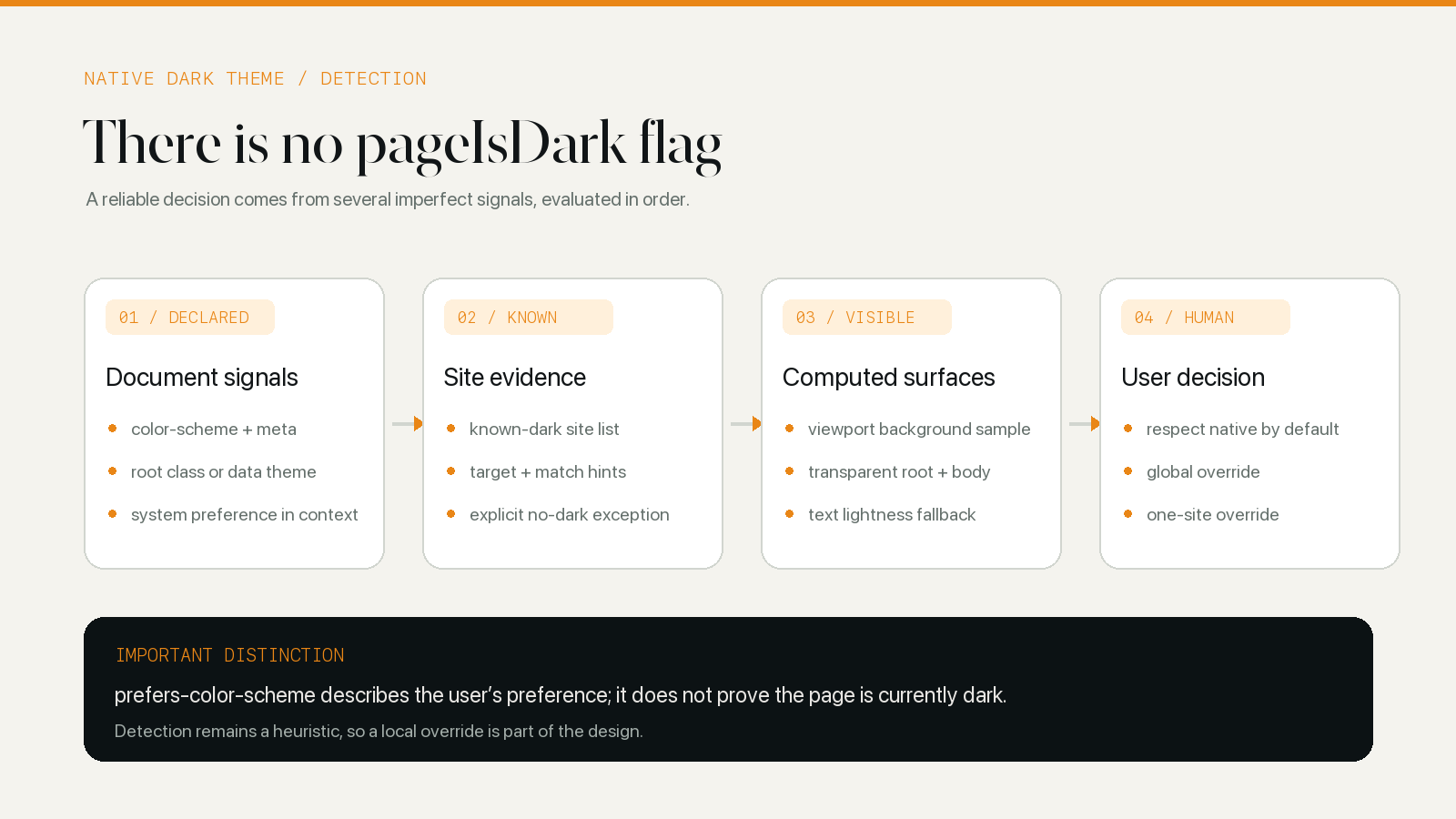
Preference, support, and appearance are different facts
prefers-color-scheme: dark reports a user or system preference that CSS can respond to. It does not say that the current website responded. A page may ignore the media query, use it for one component, or offer an independent appearance control that is set to Light.
color-scheme answers another question. A root declaration such as this tells the browser that the document can work with both schemes:
:root {
	color-scheme: light dark;
}
That declaration allows Safari to choose suitable canvas defaults, controls, scrollbars, and system colors. Most branded page colors still need author CSS. WebKit’s guide to dark mode in web content makes the limitation explicit: websites opt in and provide their dark styles; Safari does not automatically darken arbitrary web content.
A detector therefore needs to keep three facts apart:
- Preference: the system or user currently prefers a dark appearance.
- Support: the document says it can operate in a dark color scheme.
- Appearance: the important visible page surfaces are dark now.
Conflating them produces a familiar failure: the iPhone is set to Dark, the website remains white, and the extension stands down because it saw a media-query capability rather than the page result.
Explicit evidence comes before page sampling
Direct evidence is cheaper and usually more stable than measuring rendered colors. The detector begins there, but it does not rely on one universal selector.
Document declarations and theme markers
A color-scheme meta element can declare a dark-only document or list dark among the available schemes. In the latter case, the detector considers the current system preference as part of the decision. The computed root color-scheme is also useful when it resolves to dark.
The detector recognizes a few common conventions: a dark class on the root or body, or data-theme="dark" on the root. These are not web standards. They are pragmatic markers with a narrow meaning, which is why the implementation does not scan for every class name containing the word “dark.” A product card named .dark-blue would be terrible evidence for the whole page.
An inverted root is another strong clue. A site that applies filter: invert(1) to its own document is already performing a page-level transformation. Adding a second dark renderer over it would make the result harder to predict.
Site knowledge handles deliberate exceptions
General rules cannot describe every site’s theme switch. The detector uses two forms of site evidence before falling back to color sampling.
A known-dark list lets background logic recognize domains whose dark behavior is established. Detector hints can be more specific. One hint can name a target element and the class or attribute that proves its native dark state. Another can say that a site follows the system scheme. A NO DARK THEME entry records the opposite: a tempting signal on that site should not be trusted as a complete native theme.
There is also a small site-assist layer for current site-specific behavior. It can point to the selector that marks dark mode or force the general detector not to infer a built-in dark theme. These entries should remain narrow. A selector that is safe for one domain should not quietly become a rule for the web.
This is the first place where Site Guides and Technology meet. A site guide supplies the dated observation; the detector configuration records only the smallest implementation fact needed to reproduce the correct decision.
Computed surfaces provide the visual fallback
When no explicit signal settles the question, the detector inspects the page that Safari has actually laid out. It samples elements across a grid in the visible viewport and reads their computed backgrounds. Images are skipped because a dark photograph is not a dark page surface.
An opaque sampled background that is clearly bright is evidence against a complete dark theme. Repeated dark surfaces support the opposite conclusion. This is deliberately a sample rather than a walk over every node: scanning a large application tree during startup would create more cost without turning appearance into a certainty.
Transparency is the awkward part. A card with background-color: transparent may be visually dark because of a parent surface underneath it. The document root and body may both be transparent and rely on the browser canvas. The detector therefore combines alpha and lightness instead of treating transparent as black or white by definition. If it cannot obtain an opaque root surface, a light computed text color becomes another clue that the document expects to sit on something dark.
The detector also contains a browser-specific exception for a computed background known to appear while some stylesheet changes have not applied synchronously. That case is treated as not dark rather than trusted. It is an unglamorous detail, but native-theme detection is mostly a collection of decisions about which evidence not to overvalue.
Surface sampling remains fallible. A page with a black hero, dark navigation, and a white workspace below the fold can look dark at one viewport and bright at another. The result is useful as a default, not suitable as an irreversible verdict.
Timing determines which page the detector sees
Running the test at document_start would often inspect an empty shell. Waiting unconditionally for every resource would expose the original bright page longer than necessary. The implementation waits until the body has height, contains meaningful elements, and has author styling that can be judged. If those conditions are not ready, a mutation observer watches for the first usable state; document readiness provides a later fallback.
Site hints have their own timing problem. The target for a theme switch may be inserted after initial HTML, or its matching class may change when the user taps the site’s appearance control. The detector observes both cases: first for the target to exist, then for the target’s attributes to match the configured evidence.
This timing logic sits inside a larger extension lifecycle. The content script can be frozen, resumed, or restored with a Safari page, while the background context can be recreated. Manifest V3 vs Manifest V2 explains why the surrounding connection cannot be treated as permanently alive.
The extension must not detect its own dark theme
By the time a general appearance check runs, an early fallback or generated style may already be present. If the detector simply reads the current screen, it can “discover” the darkness the extension added itself and immediately remove it.
The current detector avoids that loop by identifying injected Dark Reader style sheets, including constructed sheets with the renderer’s markers, temporarily disabling them, measuring the underlying author page, and then restoring them. It also ignores injected style markers when deciding whether the document has enough author styling to inspect.
This is one reason detection belongs inside the renderer’s architecture rather than in an unrelated one-line script. The detector needs to know which styles are its own. The broader message flow is mapped in How Safari Dark Mode Extensions Work.
Background logic turns detection into policy
A detector produces evidence; background logic decides what to do with it. The current implementation combines three layers for a dark preset:
- A static known-dark result or a live result reported by the top frame.
- The global or per-site choice to respect or ignore native dark mode.
- The current global or per-site mode, pause state, automation, and theme.
If the page is physically dark and the relevant setting says to respect it, background logic sends a clean-up result rather than another dark render. If the user has chosen to ignore the site’s dark theme, the extension continues with the selected theme. A per-site choice wins without changing unrelated domains.
Light reading presets need a different interpretation. Sepia and Mint are intentionally light palettes, so the current decision logic does not treat an already-dark page as an automatic reason to suppress them. The user is asking for a different reading surface, not for a second dark conversion.
That distinction is easy to lose if native detection is described as a global “do nothing on dark sites” switch. It is one input to a theme decision, and the requested destination palette matters.
False positives and false negatives fail differently
A false positive means the detector decides the site is dark when a significant surface is still bright. The extension stands down, leaving the user with the very page they wanted changed. Partial native themes, overbroad site hints, and dark landing headers are common shapes of this error.
A false negative means the detector generates a theme over a page that was already dark. That can flatten a carefully designed palette, transform colors twice, or make controls and media harder to read. Nonstandard theme switches and late page initialization can create this direction of error.
Neither can be eliminated across the open web. The useful engineering response is to keep the general detector conservative, make site hints reproducible, and give the user a local override. The useful editorial response is to describe which state was tested instead of claiming that a domain simply “has dark mode” forever.
The Classic Midnight Wikipedia field test shows why the distinction matters: Wikipedia’s native dark appearance and an extension-generated result can look close on the same article, but one is selected by the website and the other is inferred from its light CSS.
A detector test needs more than one screenshot
A serious test should cover the site’s own Light and Dark controls, system Light and Dark, a fresh load, a restored tab, and a route change that does not reload the document. It should revisit dialogs, menus, editors, and account surfaces that may use another theme implementation. Transparent roots and pages with a dark header over a bright body are useful stress cases.
The expected outcome also needs to be written down. When the native theme is active, a dark preset should normally stand down. When only the system preference is dark and the page stays white, the extension should still render. When the site changes its theme after load, the decision should be recomputed without requiring the user to close the tab.
There is no final selector or lightness threshold that makes this problem disappear. Native dark-theme detection is a layered, revisable judgment. Its job is to choose a sensible default quickly, expose the uncertainty through a per-site override, and stay responsive as the page changes.