YouTube already has a native dark theme in Safari. Open the account menu, choose Appearance, then select Dark theme or Use device theme. If YouTube’s own result is working, it is normally the best option: the site controls the player, menus, comments, live chat, thumbnails, and Ambient mode as one system. A Safari extension becomes useful when you want the same chosen palette across websites or need a per-site override, but it should not recolor an already-dark YouTube page by accident.
That makes YouTube a useful dark-mode test for an unexpected reason. The hard part is not turning a white feed black. It is knowing when to do nothing, and keeping the video itself untouched when an extension does need to adapt the surrounding page.
YouTube’s own theme should be the first choice
The current YouTube Help instructions list three web appearances: Light theme, Dark theme, and Use device theme. The last option follows the device setting rather than forcing one appearance. YouTube also ties Ambient mode to its dark theme, so a native watch page can include lighting effects that belong to the player experience rather than the ordinary page background.
That effect is a useful reminder that “make the page dark” and “replace the site’s dark design” are not the same job. Ambient mode derives a glow from the video and coordinates it with the player. An extension does not reproduce that YouTube feature when it adapts a light page; its job is to keep the media intact while changing the document around it.
On iPhone Safari, the exact account-menu layout can differ between signed-in and signed-out views. The important point is ownership: changing iOS to Dark Appearance supplies a preference, while YouTube’s Appearance choice decides whether the website follows it. If the site remains light, confirm its own setting before looking for an extension problem.
This guide is about youtube.com in Safari. It does not cover the YouTube iOS app, YouTube TV, YouTube Studio, embedded players on unrelated domains, or YouTube Music. Those are different products or document contexts and should not inherit conclusions from the main watch site.
A watch page is more than a dark background
YouTube combines a media player with an application shell that can change without reloading the document. The header, search suggestions, video details, channel controls, comments, recommendations, popovers, and sign-in prompts are separate surfaces. Treating the finished screen as one bitmap would make some of them dark quickly, but it would also remove the information needed to protect media and preserve hierarchy.
Video and thumbnails must keep their colors
The video is the subject of the page. Reversing or tinting it is not a cosmetic defect; it changes the material the viewer came to watch. Thumbnails have the same requirement because color, lighting, skin tone, and text baked into an image can all carry meaning.
The dynamic rendering path handles images and video separately from CSS backgrounds and text. The surrounding watch page can be adapted while the actual video remains in its original color space. That separation, along with its limits for canvas and bitmap diagrams, is explained in How Dark Mode Extensions Protect Images and Video.
Player controls and overlays belong to the media layer
The player contains translucent control bars, progress indicators, captions, settings menus, end screens, and temporary overlays. Some elements sit inside the player; others are positioned over or next to it. A broad filter can recolor the progress bar, make an overlay opaque, or change a brand color that should remain recognizable.
The shipping configuration contains focused handling for YouTube’s player and overlay regions. It is not a declaration that every player element should be ignored. The rule is narrower: preserve the media and its controls where a general page transformation would produce the wrong result, while still allowing the surrounding page surface to follow the selected theme.
Comments, live chat, and menus arrive later
Comments may load only after the initial watch page is visible. Replies expand in place. Live chat has its own bubbles, input fields, menus, and embedded frame. Search suggestions and account menus appear only after interaction. A screenshot of the first viewport cannot prove that any of those states is correct.
For that reason, a useful field test needs more than a dark home feed. The watch-page pass below keeps the player controls visible and includes the first loaded comment preview. Settings menus, expanded comment threads, and live chat remain separate surfaces; they should not be treated as verified merely because the initial watch page looks correct.
How the extension recognizes native YouTube dark mode
When YouTube’s dark appearance is active, its document root carries a dark-state attribute. The detector watches that root state. With the normal “respect site dark mode” behavior enabled, a positive match tells the extension not to generate another dark theme over YouTube’s own work.
This is stronger evidence than the iPhone appearance by itself. YouTube can be fixed to Light on a dark iPhone, fixed to Dark on a light iPhone, or set to follow the device. The page marker describes the appearance that YouTube is actually presenting.
The detector still sits inside a larger decision. A user can choose a per-site override, and a site marker can change after the page has loaded. The extension therefore treats the marker as current evidence rather than a permanent label attached to the domain. How a Safari Extension Detects Native Dark Mode covers the full order of signals and overrides.
What the YouTube compatibility rules are doing
The project ships separate compatibility resources for dynamic rendering, filter-based rendering, and static themes. They are not all applied at the same time.
For the dynamic engine, YouTube’s large set of CSS custom properties is the main challenge. Those variables describe application backgrounds, text levels, dividers, search fields, buttons, live-chat surfaces, and player-adjacent UI. The compatibility layer gives the renderer stable source roles to transform and corrects a small number of elements that do not behave like ordinary CSS colors.
Filter and static engines need different protection around the player, custom banners, controls, and media. Their rules should not be cited as proof that the dynamic engine performs the same operation. The shared outcome is what matters to a reader: page chrome can change, video should not, and native dark mode should not be processed twice.
This distinction is why a site guide should not publish a list of selectors. Selectors change as YouTube ships new components. The durable explanation is that YouTube requires native-theme detection, media protection, CSS-variable handling, and late-page observation. How Dynamic Dark Mode Rendering Rewrites a Web Page explains those mechanisms without tying them to one revision of YouTube’s markup.
Why navigation is a separate problem
Opening a recommendation often changes the route and replaces major parts of the page without performing a traditional full reload. The player may be reused, a mini-player may persist, and new comments or recommendations can arrive after the route changes. A dark result that works only on the first document load is incomplete.
That kind of route change exercises the extension lifecycle as much as the palette. It can also expose a white flash from YouTube’s startup paint, the route transition, or the extension waiting for enough page structure to render safely. The field test below stays on one watch page, so it does not make a claim about mini-player persistence or a second video opened in the same tab.
The YouTube watch-page field test
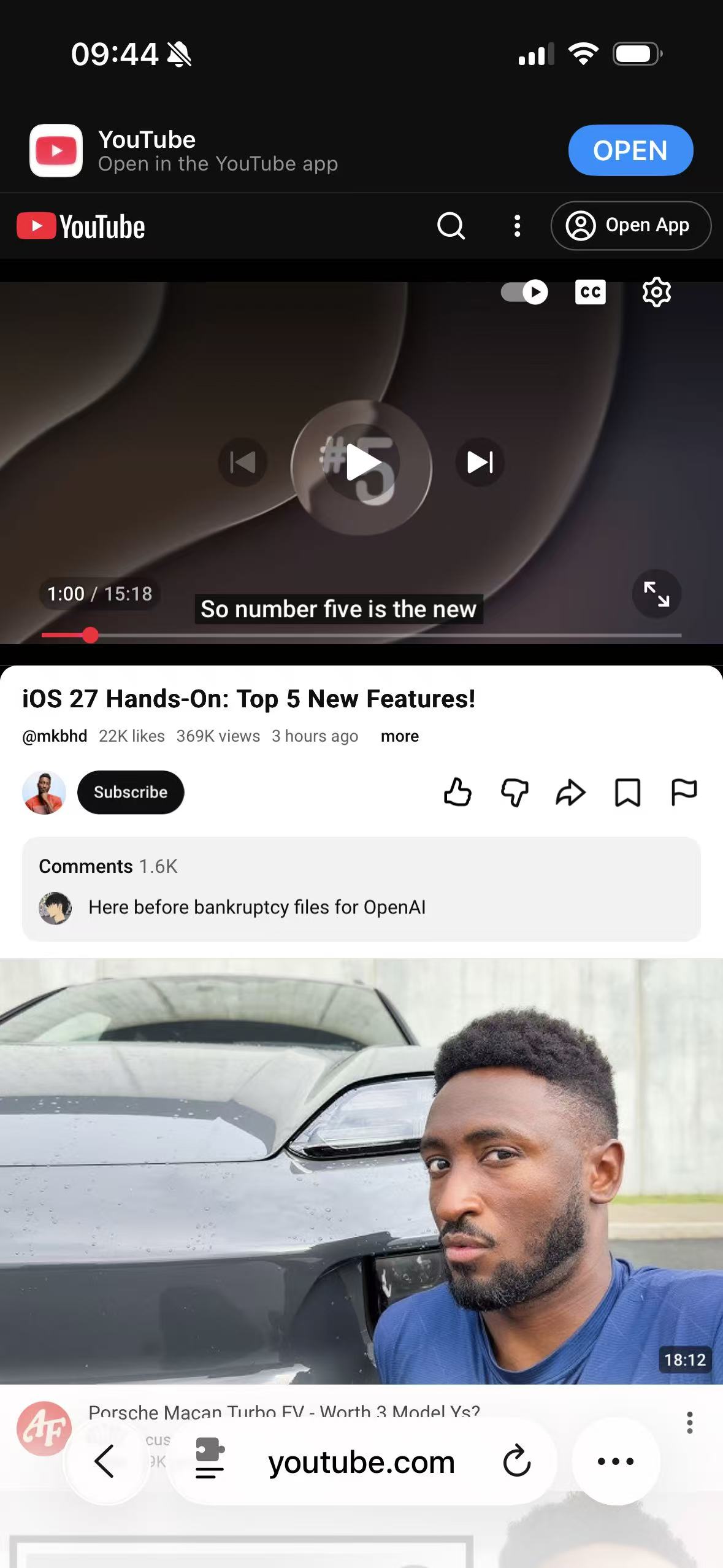
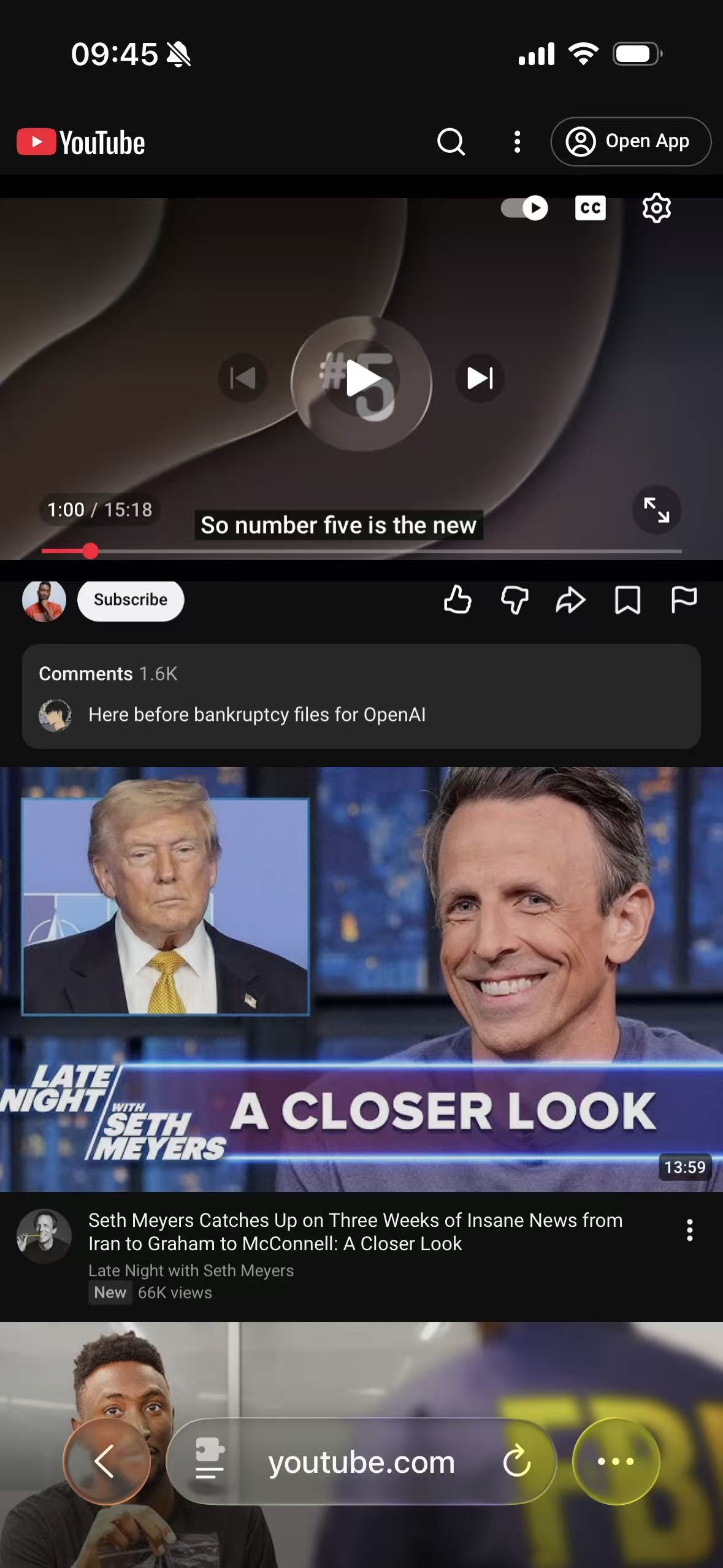
The matched captures use the public video iOS 27 Hands-On: Top 5 New Features! on the mobile YouTube website. The player is paused at 1:00 with captions and controls visible. This frame gives the comparison a color-rich video image, the red progress indicator, white player controls, page chrome, action buttons, and a loaded comment preview.
| Test detail | Recorded state |
|---|---|
| Device | iPhone 16 |
| Operating system | iOS 26.5 |
| Browser | Safari |
| Website surface | Public mobile YouTube watch page |
| Player state | Paused at 1:00 with captions and controls visible |
| Compared states | YouTube Light, YouTube native Dark, and Light adapted by a Safari dark extension |
| Account state | Signed out |
| Last verified | July 14, 2026 |
YouTube Light
YouTube native Dark
Extension-rendered dark
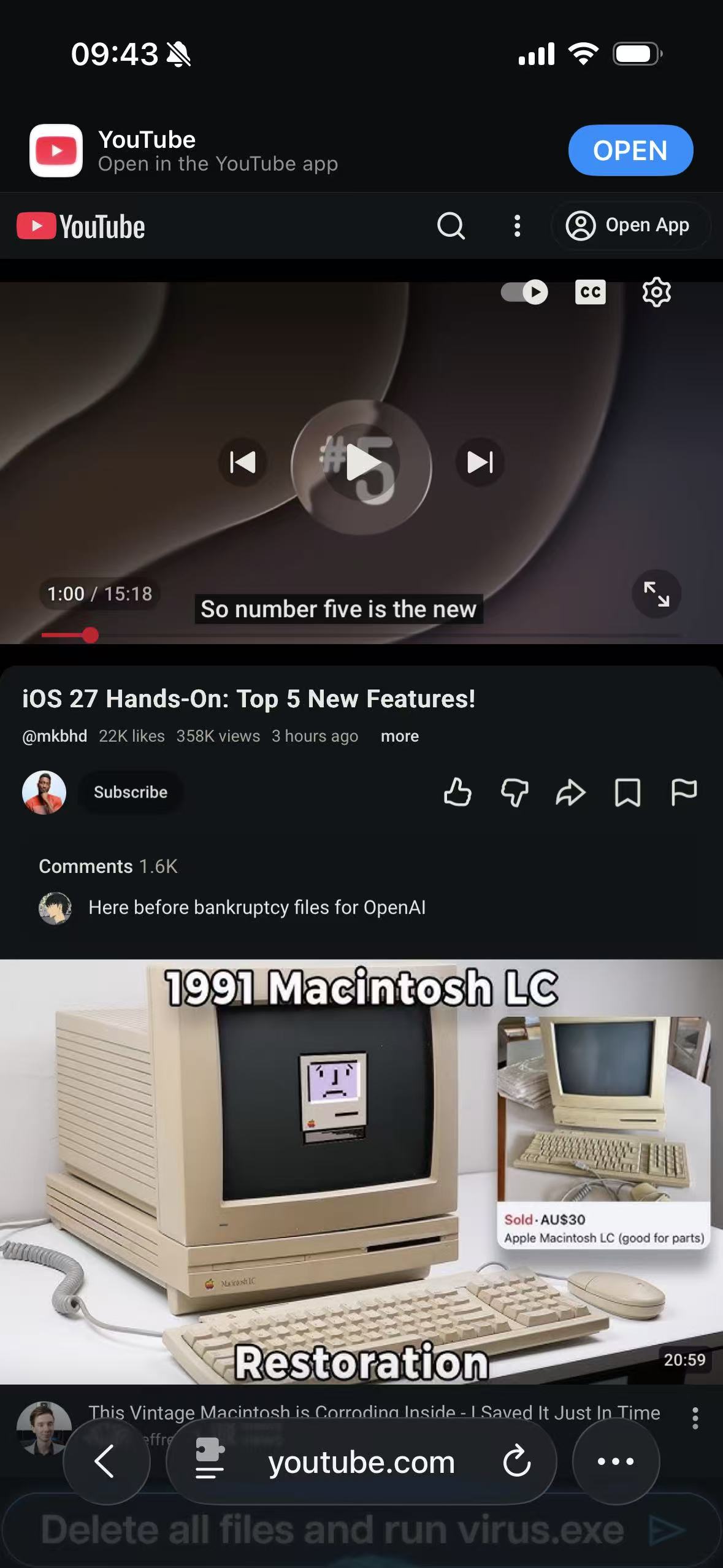
The video frame keeps the same colors in all three captures. YouTube's native theme owns its black page shell, while extension rendering adapts the light shell without tinting the video, red progress bar, channel avatar, or recommendation thumbnails that remain just outside the published crop. The loaded comment surface also stays distinct from the page behind it instead of collapsing into one flat background.
This is intentionally a narrow result. It verifies one public watch page under recorded conditions. It does not verify the settings menu, expanded replies, search suggestions, live chat, Shorts, ads, or route changes between videos.
If YouTube stays light or changes twice
First decide which system should own the page. To use YouTube’s native appearance, open Appearance and choose Dark theme or Use device theme. To use an extension palette, leave YouTube in Light, confirm Safari has granted the extension access to youtube.com, and check the site-specific choice in the companion app.
If the page is dark but looks unexpectedly recolored, verify whether YouTube native Dark and an extension override are both active. Returning one layer to Light or restoring “respect site dark mode” is a cleaner starting point than adjusting colors on top of two transformations. If the player is correct but a menu or comments remain bright, capture that open state rather than only the main page; it is likely a late or specialized component.
The Safari permission sequence is in How to Enable Dark Mode for Websites in Safari. YouTube’s native Dark theme remains the sensible default. The value of a Safari extension here is controlled consistency and a local override, not replacing a complete native theme simply because another dark option exists.